


“We were surprised that a product like this didn’t exist”: Aussie startup solves major hybrid work headache


Dubbed one of the 100 Best Inventions of 2021 by TIME Magazine, espresso is the Aussie startup that’s filling unexpected gaps in the new world of hybrid work.
Founders Will Scuderi and Scott McKeon had their lightbulb moment while studying engineering at the University of Technology Sydney in 2018.
“We were doing a university assignment and needed a second screen for our laptop,” Scott tells Kochie’s Business Builders. “We were surprised that a product like this didn’t exist and as engineering students we wanted to see if we could make one ourselves.”
Initially, the idea was to design a product for frequent travellers and people using co-working spaces. One global pandemic later, and suddenly Will and Scott’s product – an ultra-thin, ultra-portable touchscreen display – had a larger ‘work from anywhere’ market than they could’ve ever anticipated.
“We are seeing more businesses approach us about including our displays as part of their standard hybrid work program,” Scott says. “It makes sense that companies that have great hybrid work programs will get the most out of their staff, and that has a substantial business case compared to the cost of our products.”
Billed as ‘The World’s Thinnest Portable Monitors’ (at 650g), espresso’s touchscreen displays disrupt the traditionally less flexible second screen options on the market. With the business growing tenfold over the past year and setting up offices around the world, the demand only keeps growing.
“In remote working, being able to collaborate online through drawing is becoming very popular as that is a limitation of remote work at the moment with few alternative solutions available,” says Scott. “We’re also seeing travel and mobility has been increasing over the last few months, which was our original use case.”
To test out different use cases, three Pinstripe Media (publisher of Kochie’s Business Builders) team members gave espresso a shot…
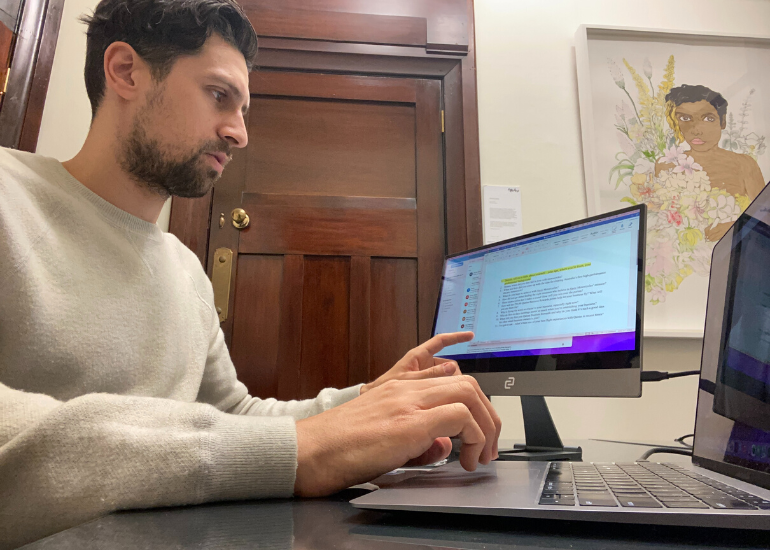
“I work between three locations – the office, my place and my mother-in-law’s place (someone needs to walk the dog and eat her epic pavlova). We keep all of our monitors at work because we hot desk, so I haven’t had a second screen at home since the lockdowns. So twice a week I’m squashing open tabs, spreadsheets, emails, messages, article drafts and video and image edits onto one overpacked screen.
I trialled the espresso 15 Touch and was immediately surprised by the lightness. It’s a major plus because I’m already lugging around a laptop, chargers, cables, headphones and most importantly, snacks, in my backpack.
When using it for the first time I learned a valuable lesson – do your computer software updates! To use the display’s espressoFLOW program, which gives you full functionality of its touchscreen capabilities, I needed to update to macOS 11 (which I should’ve done earlier anyway).
Once I had the espresso set up, I dragged my Outlook and Slack to the display so I could keep team comms there and focus on the tasks in front of me. I found myself able to block out some of the noise of the day a little easier and push through some more involved research tasks. Green tick.
The best use for me was when I was doing a Zoom interview for an article and kept my questions up on the display. This allowed me to focus on the rapport with my interviewee without having half the screen taken up by a document. It’s the little things.”
Most useful for: Creative multitaskers, busy commuters, focus warriors
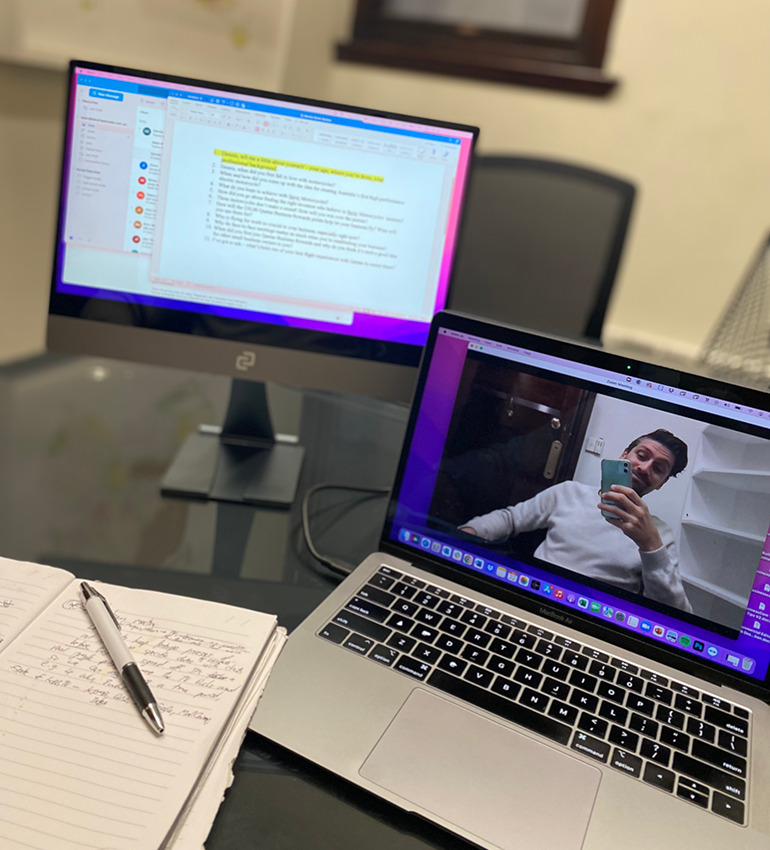
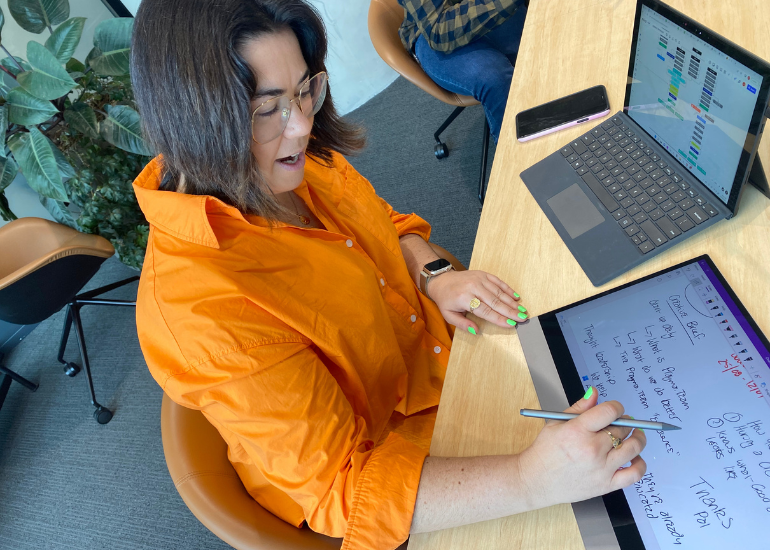
“At first I was a bit skeptical about trialling this product. I would consider myself quite an early adopter to tech productivity tools – I jumped on the first release of another tablet and other devices with a stylus component. So I didn’t think I needed anything to make my life technically easier in this space.
There were limitations to my current setup I didn’t even know existed until I tried the espresso display with a stylus (the espressoPEN). I am always on the move – my meetings and presentations are on the go – and one of the things I really struggle with is using my current tablet as a laptop and being able to take notes and “whiteboard” my meetings.
Working in marketing for a creative agency, I spend a lot of time working on creative briefs, which I like to draw up my ideas and share with the team. The espresso display and the pen allowed me to extend my Surface touchscreen experience into a second screen using Microsoft Whiteboard, which I LOVE!
As always, getting a new tech device takes a little getting used to. The espresso is super sensitive and the screen isn’t as bright as what I’m used to when in Whiteboard mode. But after more than a week of using it, I’m a convert.”
Most useful for: Brainstormers, visual thinkers and on-the-go collaborators
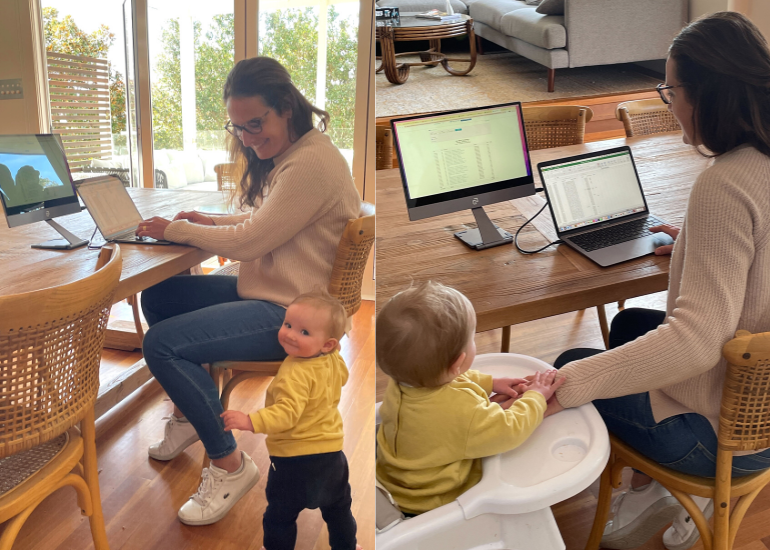
“I run the numbers at Kochie’s Business Builders publisher, Pinstripe Media. Promise it’s way more fun and interesting than it might sound!
Since I had my fourth child last year, I’ve predominantly been working from home. I’ve always wanted a second screen in my study to help juggle spreadsheets and our accounting platform, but held off because there simply wasn’t room between the kids’ desktop computer and piles of school textbooks.
So when I took home the espresso display for a week, I immediately could see the benefit of it from a space perspective. Yes, it’s light and compact, but my favourite feature is there’s no power cord. A traditional monitor would need a chunky cord and a plug.
It meant I could set up anywhere in the house, connect the display to my laptop with a short HDMI cord and away I go – no charging or power point needed. I loved how easy it was to pack up the slim display and store it away from the chaos that descends on my house in the evening.”
Most useful for: Remote workers or anyone with limited space
Want to try for yourself? Here are some links for more info:
This article is brought to you by Kochie’s Business Builders in partnership with espresso.
Feature image: Left to right – Espresso co-founders Gary Caldarola, Scott McKeon, Will Scuderi, Fabian Maritato.

Adam Bub is the Head of Commercial Media at SmartCo Media (formerly Pinstripe Media), managing digital and TV partner content for Business Builders, Startup Daily, SmartCompany, Flying Solo and Your Money & Your Life. Previously an editor at Nine Digital and Mamamia, Adam is a strategic storyteller who loves creating value for audiences and brands. Adam has led content-driven media campaigns for 100s of global and local brands, including IKEA, Amazon and Dell Technologies. Adam interviews entrepreneurs on the Business Builders podcast First Act.


Comments