


Are you using this clever smartphone feature for your business?


If you could turn your smartphone into a payment terminal in minutes, would you? Thousands of Aussie business owners are already doing just that with Tap to Pay – a fast and convenient way to accept contactless payments on the go.
For sole traders and mobile operators, Tap to Pay means you don’t have to invest in extra hardware or juggle invoices and bank transfers. You can just take payments, on the spot, with the phone you already carry around all day.
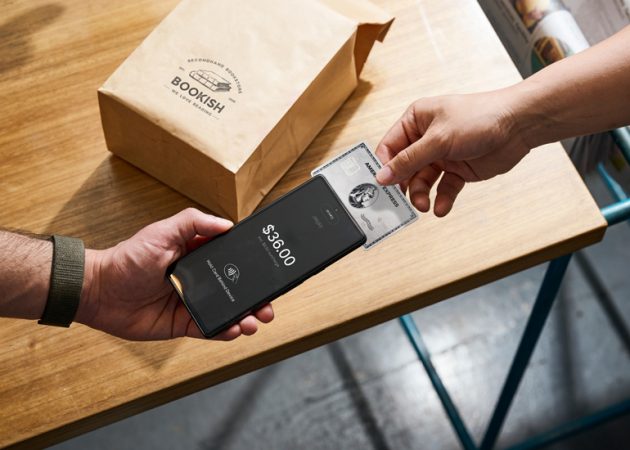
Tap to Pay is a feature that turns compatible smartphones into secure, contactless payment devices. Customers simply tap their contactless-enabled credit card (or a digital wallet like Apple Pay or Google Pay) onto the merchant’s smartphone – no card reader or EFTPOS machine needed.
“Tap to Pay is perfect for anyone who’s mobile, working on job sites or at events,” says Joshua McNicol, Director of Growth at Zeller, adding that you don’t need a bulky terminal or cords or cables – you just download the Zeller App (which you can use as your Tap to Pay app).
“The great thing with Tap to Pay is that it can get you up and running to accept payments in minutes. If you sign up for a Zeller account online, it takes just a few minutes to get set up,” McNicol explains.
Once you’ve set yourself up to take payments on your phone through the Zeller App, Tap to Pay works just like a normal terminal. You can accept every card – including American Express – at one low, flat-rate transaction fee, exactly as you would with traditional EFTPOS hardware, and it’s powered by the same security protocols and powerful reporting so you’ll still get that real-time transaction visibility.
It’s a game-changer for mobile operators, McNicol says, who’ve been underserved by clunky and overpriced point-of-sale systems.
Think of a plumber or an electrician who finishes a job and wants to get paid on the spot, or a florist running a stall at a farmers’ market.
“If you’re only accepting two or three payments a day, you don’t want to be invoicing,” McNicol says. “You want to take it from your clients on the spot.
“Tap to Pay is a really affordable, easy way to do that using your smartphone, which you’re going to have in your pocket already. You’re getting the payment immediately and those funds settled to your account on the same day.”
But it’s not just for solo operators. McNicol says he’s seeing uptake among larger businesses too – especially ones who want to give multiple staff the ability to take payments without needing to invest in additional terminals.
Traditional card terminals can be expensive to rent and slow to set up. Tap to Pay is a much sleeker alternative – with zero monthly hardware fees.
“There are no upfront fees, no hidden charges, no chargeback fees,” McNicol says. “It’s designed to be almost like a pay-as-you-go or pay-when-you-use-it system that’s really affordable for business owners. And when you’re not using the hardware, there are no recurring costs.”
That makes it a great option for side hustles or new businesses testing out in-person sales for the first time. You’re not stuck in a contract or paying for something you might only use on weekends.
McNicol says that Tap to Pay is part of a much larger trend towards mobile-first business tools – but that the right solution won’t be the same for everyone.
“Tap to Pay gives business owners that diversity in terms of options and ways to accept payments,” he says. “Some of the interesting trends we’re seeing with business owners is in having a blend of both.
“We’ve got pubs and restaurants who will use a Zeller Terminal for accepting payments over the bar, where it’s busy, but then for outdoor dining they will run payments from an Android smartphone using Tap to Pay. It gives you a range of options based upon the use case.”
Setting up Tap to Pay with Zeller is refreshingly simple. All you need is a smartphone and the Zeller App. From the dashboard, you’ll see the option to activate Tap to Pay – it only takes a couple of steps and then you’re good to go.
From there, you can enter an amount, present your phone to the customer and accept contactless payments on the spot via NFC (Near Field Communication tech). It’s the same experience your customer would have with a physical terminal – just faster and easier.
Better yet, the Zeller App also has integrated tools for tracking sales, issuing digital receipts, building a menu to track items sold, applying discounts and service charges, viewing daily summaries and much more – so you can manage your entire POS and payment workflow in one place.
Ready to learn more or get started with Zeller Tap to Pay? You can get everything set up in a matter of minutes and then enjoy a more streamlined business experience – for both you and your customers.
Set up your Zeller Tap to Pay here.
WATCH VIDEO FOR MORE:
This article is brought to you by Business Builders in partnership with Zeller.
Feature image: AdobeStock

Simon Jones is a writer, editor and freelance content marketer working across the technology, finance, B2B and B2C sectors.


Comments